
What the kiosk knows
Hangarworks 2.0.5 reads the Fabrication Kiosk for you: point a phone at it or hand the website a screenshot, and every stack's amount and quality comes in. Plus refinery work orders, a guided tour of your own blueprints, Star Citizen 4.10.3, and a first look at the Codex coming in 2.1.
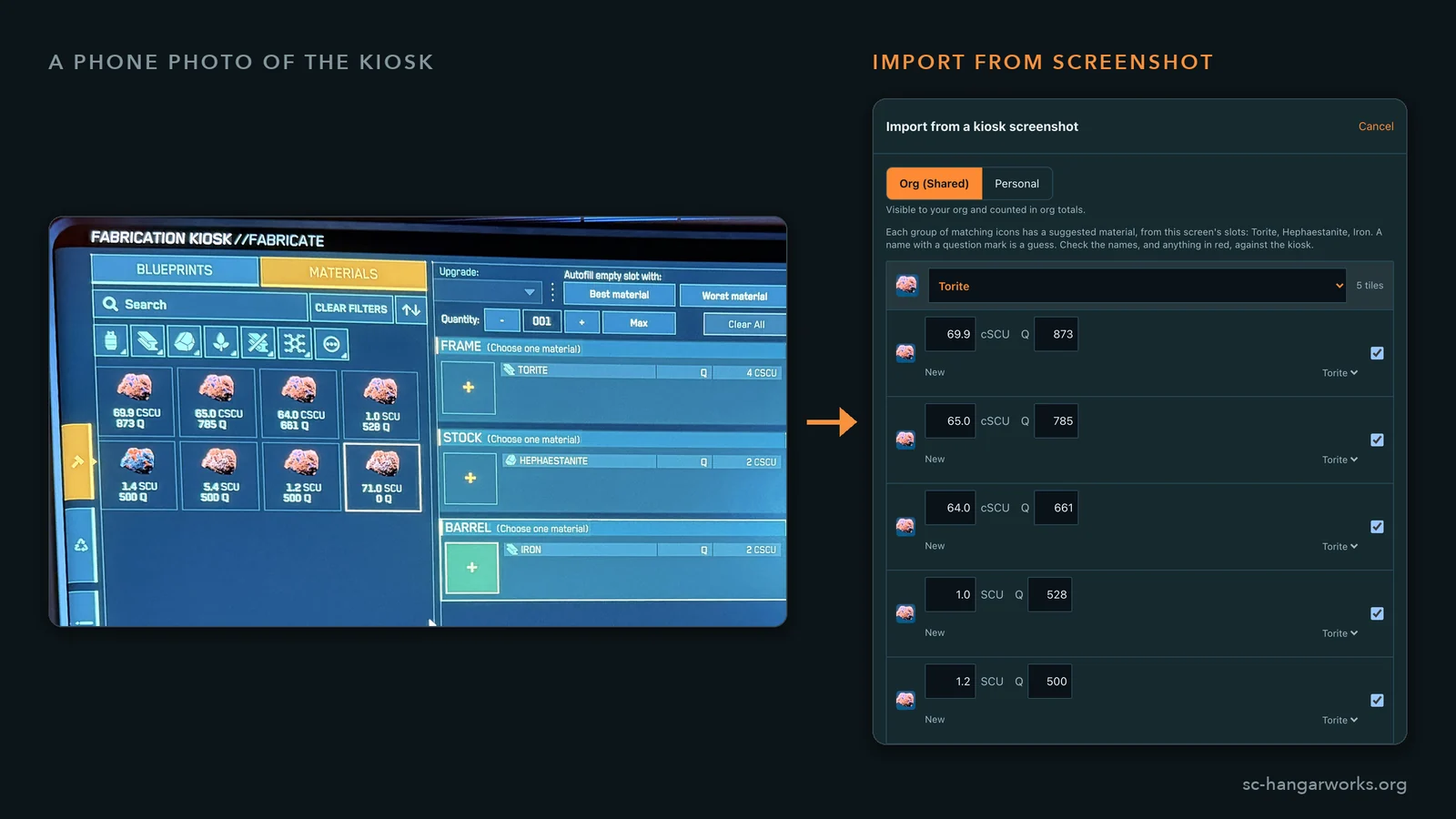
The Fabrication Kiosk knows exactly what you own: every stack, how much of it, and at what quality. It tells you, too, as a grid of rocks with no names on them, which is roughly how a museum would look if somebody stole all the little cards.
Until now the only way to get any of that into Hangarworks was to read each tile and type it in, because the game's log, which records a startling amount of what you do, has never once written down a quality. 2.0.5 reads the kiosk for you.
Point your phone at it
On the phones, Resources has a camera button. Point it at a kiosk's Materials tab and the scanner reads every tile's amount and quality, on your phone. Nothing is uploaded: your photos of a monitor remain your own private photos of a monitor. Anything it isn't sure of is flagged for you to check before it's saved.
Tiles carry no names, so the scanner sorts them by the color of their icons and suggests a material from the blueprint's own slots. That works most of the time, and it says so when it's guessing. The better trick is to click a slot in the kiosk first. The kiosk then lists only that slot's material, and every tile on the screen is named for certain instead of judged by the color of a rock.
Hand-mined materials such as Hadanite and Dolivine come in by the piece, because that is how the game counts them. And a scan never counts a stack twice. The kiosk counts what is actually there, so its number replaces what you had recorded at that quality instead of piling on top. You can scan your Iron on every blueprint that uses it and you will still own exactly as much Iron, which is more than can be said for most get-rich-quick schemes. If you really do have a second pile at another station, Add on top is one tap away.
Or give the website a screenshot
The website does the same from a picture: Resources, Import from screenshot. Drop in a screenshot, paste one, or use a phone photo of your screen taken at whatever angle your arm was at. The reader runs in your browser, so your screenshots don't leave your computer either. The first time, your browser downloads the reader, about 20 MB, and keeps it.
A tour of your own blueprints
Here is the catch with clicking slots. Each slot takes exactly one material, so seeing everything you own named for certain means opening the right blueprints and clicking the right slots, and nobody in the history of the 'verse has wanted to work out which.
So Hangarworks works it out. Scan everything you hold plans the fewest of your own blueprints whose slots between them reach every material you could hold, and walks you through them: this blueprint, these slots, next. On the phones the next stop sits in the scanner's panel and ticks itself off as the scanner sees each slot. Own every blueprint and it's 18 stops for all 37 materials, which is less a chore than a short, well-organized pilgrimage.
Refinery work orders
Give it a picture of a refinery terminal's finished work order and it reads what the order yields. Every row names its material, so nothing is guessed, and the rows are checked against the order's total.
That check matters because the list on the terminal scrolls, and a row can quietly drop off the bottom of your screenshot. Hangarworks notices, tells you how much went missing, and asks for a second screenshot. Read alongside the kiosk, the order's yield joins the kiosk's stack the way it does in the game, so nothing arrives twice.
Smaller, but you will notice
- Clear resources, on Resources and Profile, empties your personal holdings, your org's, or both, say before a fresh scan. It asks first, on the principle that "are you sure?" is cheaper than "where did it all go?"
- Quality 0 can be recorded. Nobody can normally mine it, and yet there it sits in the kiosk.
- Energy guns in Build say how many shots their capacitor holds on the pips you've given them, and sustained DPS follows the pips all the way down to zero, which is also what happens in the game, only with more swearing.
- Org stats keep a daily history, drawn as a thin line under each tile on the org page. Org owners can hand those numbers to their own bot or spreadsheet through the read-only Org API; the how-to is at /developers.
- Star Citizen 4.10.3 is in: the Liberator, Marauder, Hyun and Galaxy with their liveries, the Raider Camo gear with its pictures, and the full patch notes. The Phoenix Emerald has left the game, so a saved Emerald becomes a Phoenix, the same ship with less green.
- FashionWorks has one tidy bar instead of buttons floating in front of your outfit, the game's 31 emotes and 16 signs, a wider view on big screens, and parts that wait for their partner piece, as they do in the game.
Coming next: the Codex
2.1 adds a new tab, and something has to make room for it. The Planner moves into Crafting, beside Blueprints and Resources, where it was always half living anyway. Its slot becomes the Codex: what the game knows, as opposed to what you own.
It opens with the item database, which moves over from Crafting, and with missions and factions. The game files describe 1,108 contracts and 24 factions, with their rank ladders, reputation, rewards and the blueprints they hand out, and today you can only reach them sideways, through a blueprint's How to Get card. The Codex turns that around: browse by faction and rank, filter by system and reward, and see what the next rank unlocks. The Reputation tracker moves in too. Codex pages are open to everyone, no account needed, so you can send someone a link to the exact mission they keep asking you about.
After that come places: more than two thousand stations, outposts, planets and moons, which services each has (a refinery, a hangar big enough for your ship, a clinic for afterwards), and what you can buy or mine there. Further out, I'm looking into whether the game files will give up the positions needed for distances and travel times for your own saved builds, and whether the planets and moons themselves can be drawn in 3D, spinning on your phone. Those are investigations, not promises. Space is big, and some of it may not want to be measured.
Where to get it
Everything above except the phone camera is on the website right now.
iOS 2.0.5 is out on the App Store for iPhone and iPad. Android is still in closed testing, because Google wants twelve opted-in testers before it will allow a production release, and we're not there yet. The sign-up is on the site, under the App Store button, and it is not a big commitment: install it, leave it installed, tell me when something breaks.